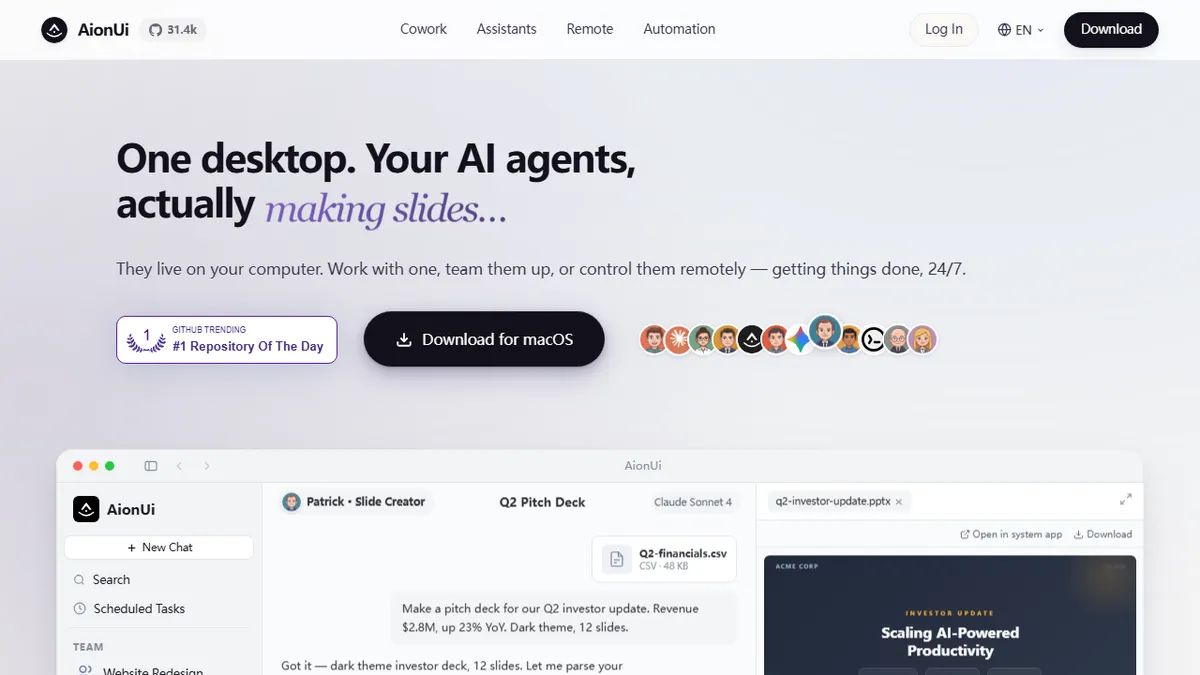
AionUi
Open-source desktop cowork app that unifies 20+ AI coding agents and CLI models in a single graphical workspace.
In short
AionUi provides a unified graphical interface for managing multiple AI coding agents and CLI models in parallel. It is best for developers who want to keep data local while switching between cloud and local models without reconfiguring terminals.
Developers and power users who already work with multiple CLI AI agents and want a single local, privacy-preserving desktop cockpit to run them in parallel across cloud and local models.
Non-technical users who want a hosted chat product, or teams that need centralised admin, SSO, and audit logs — AionUi is a personal desktop app, not an enterprise platform.
AionUi is a free, open-source desktop application that turns terminal-based AI agents into a unified graphical cowork environment. Instead of juggling separate terminal windows for Claude Code, Gemini CLI, Codex, Qwen Code, and every other CLI agent you have installed, AionUi auto-detects them and exposes each as a tab or panel inside a single desktop workspace. Sessions run in parallel, contexts are preserved per conversation, and everything — chat history, credentials, task state — stays in a local SQLite database on your machine rather than a vendor's cloud.
Beyond wrapping CLIs, AionUi ships its own built-in agent engine so you can start working immediately without installing anything else. It supports 30+ model providers: OpenAI, Anthropic, Google, DeepSeek, AWS Bedrock, Qwen, Kimi, Baidu, plus local runtimes (Ollama, LM Studio) and any OpenAI-compatible custom endpoint. On top of raw chat it adds practical productivity primitives — smart file management (batch renaming, auto-organisation, classification), a scheduled-tasks system where natural-language instructions like 'every morning at 9am, summarise yesterday's git commits' are translated into cron jobs bound to a live conversation, and a library of 21 pre-built assistants for slides, Word docs, Excel analysis, and academic writing.
A remote WebUI mode plus Telegram, Lark, DingTalk, and WeChat bridges let you talk to your desktop agents from a phone or another laptop while all execution stays on the host machine. Typical users are developers and power users who already live in Claude Code or Gemini CLI, want a nicer UI, care about keeping conversation data local, and want to switch between models mid-task without re-plumbing config files. It runs on macOS, Windows, and Linux.
AionUi is the answer to 'I have Claude Code and Gemini CLI and Codex all open in different terminals and I hate my life.' It's not trying to be an IDE; it's a well-scoped orchestration shell that respects local-first storage and BYO-keys. The scheduled-tasks-bound-to-a-conversation pattern is genuinely clever, and Apache-2.0 means you can bend it to your workflow.
— The AI Tool Bible editorial team
Pros
- ✅ One interface for 20+ CLI agents (Claude Code, Codex, Gemini CLI, Qwen Code, etc.) with auto-detection.
- ✅ Fully local storage in SQLite — no chat history, code, or credentials sent to a vendor.
- ✅ Bring-your-own-key across 30+ providers, including local Ollama and LM Studio for zero-cost inference.
- ✅ Multi-session parallelism keeps contexts separated so long tasks don't collide.
- ✅ Natural-language scheduled tasks compile to cron and stay bound to their originating conversation.
- ✅ Remote WebUI plus Telegram/Lark/DingTalk/WeChat bridges for controlling your desktop agents from anywhere.
- ✅ Apache-2.0 licensed and actively maintained; free forever with no upsell tier.
Cons
- ⚠️ Desktop-only architecture — no hosted SaaS option, so you must run it on a machine you control.
- ⚠️ Value depends on the underlying CLIs and APIs you configure; setting up keys and local models is on you.
- ⚠️ Feature surface is broad (agents, files, scheduling, assistants) which can feel busy compared to focused single-purpose IDE integrations.
- ⚠️ Documentation and UI polish trail commercial IDE assistants like Cursor or Copilot.
- ⚠️ Chinese-market model integrations (Kimi, Baidu, Qwen) are more prominent than Western users may need, adding surface area they won't use.
Use cases
Frequently asked
- How does AionUi handle data privacy and storage?
- AionUi stores all chat history, credentials, and task state in a local SQLite database on your machine. No data is sent to a vendor's cloud, ensuring a local-first approach.
- Which AI models and providers are supported?
- It supports over 30 model providers, including OpenAI, Anthropic, Google, DeepSeek, and AWS Bedrock. It also supports local runtimes like Ollama and LM Studio for zero-cost inference.
- Can I use AionUi without installing separate CLI agents?
- Yes, AionUi ships with its own built-in agent engine, allowing you to start working immediately without installing additional CLI tools. It also auto-detects existing installed agents.
- Is AionUi suitable for enterprise teams?
- No, AionUi is designed as a personal desktop app for developers and power users. It lacks centralized admin, SSO, and audit logs required for enterprise platforms.
- What operating systems does AionUi support?
- AionUi runs on macOS, Windows, and Linux. It also offers a remote WebUI mode and bridges for Telegram, Lark, DingTalk, and WeChat for mobile access.
Explore related
Compare with similar tools
All in Agents →LangGraph
FeaturedStateful, graph-based agent orchestration from LangChain.
CrewAI
FeaturedPython framework for multi-agent orchestration.
Ernie Bot
Baidu's Mandarin-first ChatGPT rival, powered by the ERNIE model family
Moveworks
The enterprise AI assistant that searches, answers, and takes action across your business systems
AWS Bedrock
Build and scale generative AI applications with foundation models
Claude Agent SDK
Anthropic's official SDK for building autonomous Claude agents.